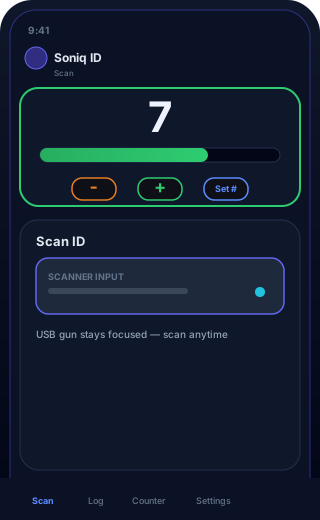
Live capacity
Shared count, color bar, +/− and Set # while you scan.

Soniq ID Checker is a free identification and driver's license checker built for bars, pubs, restaurants, nightclubs, and live music venues. Scan PDF417 barcodes on US, Canadian, and Mexican credentials with a phone camera or handheld scanner — or use photo ID fallback when the barcode won't read. Passports via MRZ when enabled. Your staff get an unmistakable pass/fail result in seconds.
No credit card. Each venue gets its own private account — your data stays yours.
A browser-based ID and driver's license age checker for your front door — not another bloated POS add-on.

PDF417 on the back of US driver licenses and state IDs (all 50 states), plus Canadian provincial IDs and Mexico credentials where AAMVA barcodes are present — including dense formats like Wisconsin.

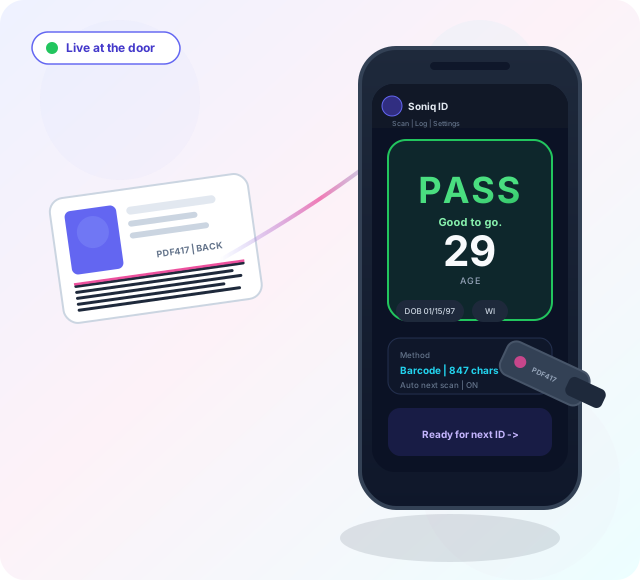
Full-screen PASS / FAIL, optional sounds, age always visible. Your bouncers don't squint at tiny text mid-rush.

Multiple staff logins, shared scan log, and per-person scan tracking — you always know who checked an ID.

Enable barcode + photo mode per device. Staff choose Take photo only (enter DOB manually) or Take photo & read (OCR). If OCR misses a date, the entry form always opens — nobody gets stuck at the door.

Photo the machine-readable zone on ICAO passports — US, Canada, Mexico, UK, EU, and other TD3 formats when you enable it in settings. Barcode remains the fastest path for North American licenses when it works.

Store nothing, age only, selected fields, or the full parsed record. The log shows the columns you pick — names, state, ID number, address, and more. Export CSV or JSON anytime.

Count guests at the door with a shared +/− counter, color bar at your max, auto +1 on pass scans, Set # for a starting count, and **Counter actions** to start over when the night resets. Syncs across every iPad and scanner station.
Scans by shift (configurable hours), day, login session, and device — with ? tooltips on each stat. Breakdowns by result, method, and door station; prune or revoke registered devices; export everything.
Know how full the room is right now — and how many IDs you checked tonight — without a second app.
Big number + color bar on the Scan tab. Tap +/− for walk-ins, Set # for a starting headcount, or let pass scans add automatically. **Counter actions** holds Start over resets. USB scanners keep focus — tap the counter and scan again immediately.
Combine all door stations into one count. Every phone, iPad, and laptop sees the same number and updates within seconds.
Owners open Counter → Usage reports for shift totals, active devices (prune / revoke), and exports. Staff see a read-only Reports tab with ? tooltips on each stat.
Download scan CSV, shift CSV, summary, full JSON bundle, capacity event log, and device list. Every reset and manual count change is logged.
Barcode first where PDF417 is available; photo OCR and manual entry when it is not.
All 50 states — driver licenses and state IDs via PDF417 barcode. Photo OCR fallback reads DOB from the card front (compact dates, lower-crop passes) when the scan fails.
Provincial driver licenses and IDs with AAMVA PDF417 barcodes (DCG/CAN). Photo mode includes a Canada document type for OCR on provincial cards.
INE and other credentials — barcode when present (DCG/MEX), plus Mexico-specific photo OCR with Spanish date labels and manual DOB entry.
Machine-readable zone on booklets from any ICAO member — nationality, DOB, and expiry from the MRZ lines. Enable per device in settings.
Photo fallback keeps the line moving — without replacing your primary PDF417 workflow.
Camera or scanner gun on the back PDF417 — still the fastest, most accurate path for US driver licenses.
Tap the photo ID button. Frame the license or passport MRZ in good light — flat, filling most of the screen.
Photo only — snap and type DOB from the ID. Photo & read — OCR tries to extract DOB from the lower half of the card front; auto age check when found.
OCR didn't find the date? Enter it manually and tap Approve. Optional staff review step before any photo check is logged.
Frame the front of the ID flat with even light — DOB usually sits in the lower half. OCR language data preloads after login so reads are faster at the rush. Storing ID photos in the log is off by default — enable per device if your venue needs audit photos (max 100, compressed, oldest removed automatically).
Real screens from Soniq ID — barcode scan, live capacity, usage reports, photo fallback, and clear pass/fail at the door.
Shared count, color bar, +/− and Set # while you scan.
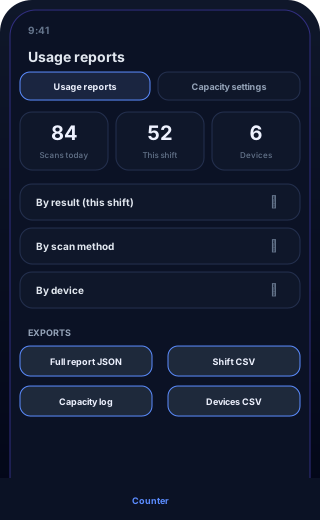
Shift stats, device breakdowns, and full exports for managers.
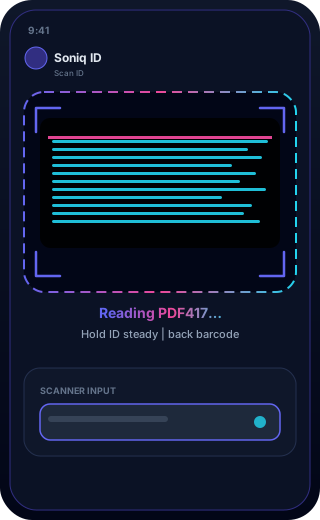
Camera or scanner gun reads PDF417 on the license back.
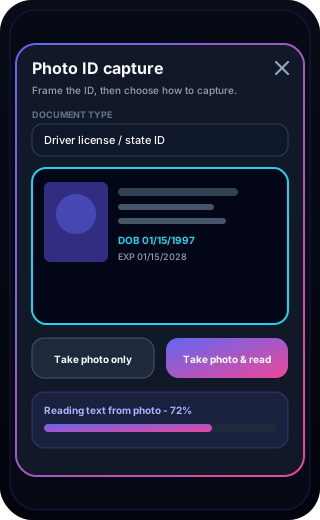
Photo only or Take photo & read (OCR) when the barcode fails.
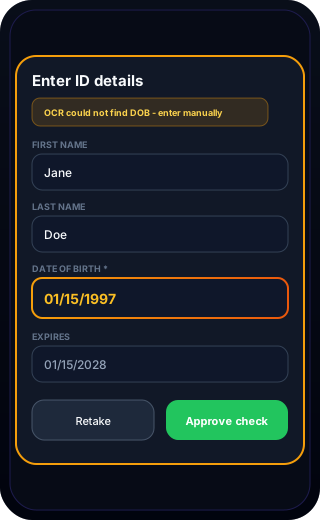
OCR missed the date? Staff enter DOB and approve — never stuck.
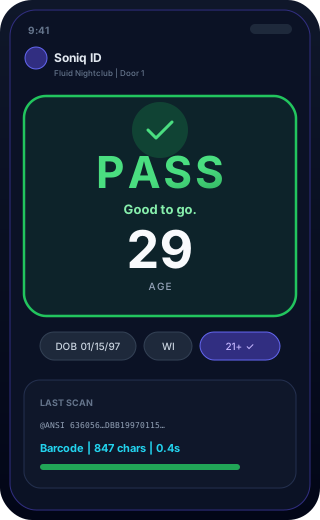
Big result, age visible, auto-clears for the next guest in line.
Because the door is loud, dark, and fast — and you shouldn't pay a fortune for that.
Soniq ID was designed with your guests in mind — collect only what you need, and delete it when you don't.
Storage mode: nothing, age only, selected fields, or full record. Check exactly which fields land in the log — DOB, names, state, ID number, address, raw scan, and more. Default is age-only for a simple 21+ check.
Venue owners and admins can clear all scan data from the back end in one step — wiped permanently, not just hidden.
Set how long scan logs are kept. Older entries are purged automatically so you're not sitting on guest data longer than necessary.
Each venue's data is stored separately from every other business. Sensitive tenant files are encrypted at rest on the server.
The scan log records which staff member ran a check — useful for your team, without turning the door into a data harvest.
Download CSV or JSON when you need records for your own compliance — then clear what you don't want to keep.
Stay on barcode-only, or enable photo fallback when needed. Storing ID photos in the scan log is off by default — turn it on per device if you need audit images (compressed JPEG, max 100 stored, oldest removed automatically).
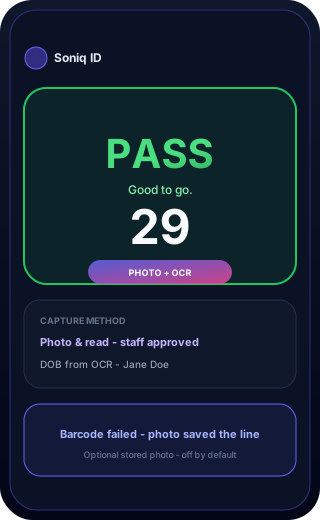
Illustrated walkthrough — not a live scanner. Five common setups cycle automatically: phone camera, handheld gun, photo fallback, lightbox, or podium laptop. Photo mode shows capture → manual entry → PASS. Tap a method or hover to pause.
Guest holds phone over the back PDF417 barcode…
Fastest when staff already carry a phone. No extra hardware — point, read, done.
Soniq ID app
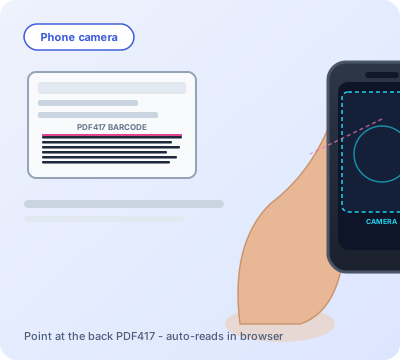
Staff phone, back of ID, auto-read
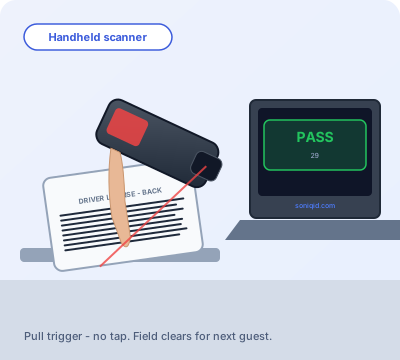
Bluetooth or USB gun at the rush
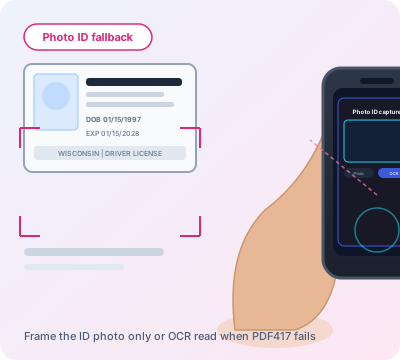
Barcode failed — photo, OCR, or manual DOB
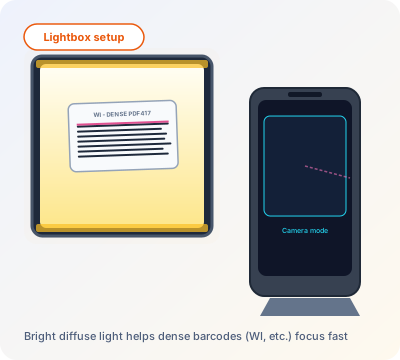
Diffuse light for dense barcodes
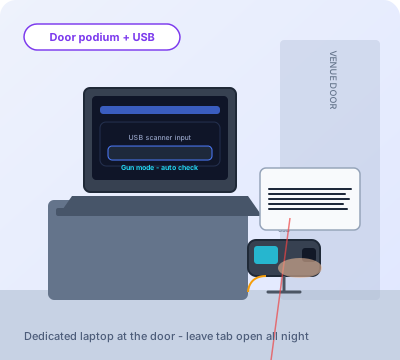
Laptop + USB scanner all night
Honest origin story from Billie Hawkins, Soniq Designs.
I was tired of paying for ID scanning — monthly fees, per-device licensing, and apps that felt like they were designed for a compliance office, not a Saturday night door.
I wanted something my venue could run in a browser: point a camera or pull a scanner trigger, get a clear answer, log who scanned what, and move on. So I built Soniq ID — the product — and Soniq ID Checker — the free platform venues can sign up for.
No venture funding pitch. No "contact sales." Just a solid door tool that respects how bars, pubs, and clubs actually work.
Handheld 2D guns that venues use at the door — always confirm PDF417 is enabled in scanner settings.
Portable gun for busy doors — pairs with laptop or tablet. Enable PDF417 in scanner settings.
View on Amazon →Plug-and-play wedge for a podium laptop. Reliable transmission for dense PDF417 IDs.
View on Amazon →Popular budget 2D gun for venues — great for back-bar PDF417 reads when configured correctly.
View on Amazon →Industry-trusted omnidirectional scanner — excellent for high-volume nightclub doors.
View on Amazon →Search curated PDF417-capable hardware. Always confirm PDF417 support before buying.
View on Amazon →As an Amazon Associate, Soniq Designs earns from qualifying purchases (affiliate tag: soniqdesigns-20).
Hardware and settings matter. A little optimization goes a long way at the door.
Handheld wedge scanners (USB or Bluetooth) are the fastest option for a busy door. Make sure PDF417 is enabled in the scanner config — not just QR/Code 128. See our recommended scanners.
Mount a cheap laptop at the podium, set scan mode to USB scanner, and leave the browser tab open. Staff tap the trigger — no clicking "check ID."
Fixed slot + LED diffuser + USB camera (or scanner gun) = repeatable reads without staff chasing focus. Slide in, scan, slide out. Full cut list, dimensions, and wiring in our DIY lightbox build guide.
Newer phone cameras autofocus faster. Set scan mode to Camera on phones; the app auto-starts the camera and reads continuously.
Set minimum age (21+), pick storage mode (age only vs selected fields), enable pass sounds, and turn on auto next scan. For photo mode: barcode + photo button, OCR review, passport MRZ, and optional stored photos.
Owners: Counter → Capacity settings — turn on live counter, set your max, choose whether pass scans auto +1, and show the bar on Scan. Combine devices for one shared count across every door station.
In USB scanner mode the scan field regains focus after you tap +/− on the counter — no extra click before the next barcode. Perfect for a podium laptop with a gun in one hand.
Fill the frame with the front of the ID, flat, even light — avoid glare on the laminate. v2.21.8+ reads the lower crop where DOB lives. If OCR still misses, staff enter DOB manually (always available). Log in a minute early so OCR preloads before the rush.
The app runs in the browser — a stable connection on your door tablet prevents timeouts. Scanner-gun mode works great offline once the page is loaded.
Under the hood — without the enterprise price tag.
Live door count with +/− on Scan. Managers get shift stats, device lists, capacity event logs, and exports — same summary super admin sees per venue.
Every check records which user scanned. Log columns match your field settings. Export CSV or JSON for your records.
Door staff change their own password from Account. Owners add users, reset passwords, and disable accounts when someone leaves.
Your data is isolated from every other business. See guest privacy for storage and delete options.
One shared app powers every customer. New features ship to all venues at once — your settings stay put.
Create your free business account in minutes — private to your venue, ready for door staff tonight.
Create logins from the Users tab. Owners can reset passwords and disable staff who leave.
Camera or scanner gun for barcodes. Photo fallback when needed. Pass or fail — instantly. Field clears automatically for the next person in line.
Quick answers for venue owners and door staff — setup, IDs, privacy, capacity, and getting back into your account.
Yes. There is no monthly subscription and no per-scanner licensing fee. Create a free venue account, add staff logins, and run the door checker in your browser. Optional tips help cover hosting and updates — they are never required.
US driver licenses and state IDs (all 50 states) via PDF417 barcode on the back. Canadian provincial IDs and Mexico credentials where AAMVA barcodes are present. Passports via ICAO machine-readable zone (MRZ) when you enable passport mode. Photo OCR and manual DOB entry cover cases where the barcode will not read.
No. You can use a phone or tablet camera, or a USB/Bluetooth handheld scanner that supports PDF417 (not just QR). Scanner-gun mode treats the gun like a keyboard — scan and the app checks automatically. See our recommended scanners list on the homepage for models venues use at the door.
Enable barcode + photo mode per device. Staff tap Photo ID — choose photo only (enter DOB manually) or Take photo & read (OCR). Frame the front of the ID flat with even light; OCR focuses on the lower half where DOB usually appears. If OCR misses the date, the manual entry form always opens so nobody is stuck at the door. Dense barcodes (like some Wisconsin IDs) often need a PDF417-capable scanner or better lighting.
You choose: store nothing, age only, selected fields, or the full parsed record. ID photos in the log are off by default. Venue owners can clear all scan data anytime or set automatic retention limits. Each venue's data is isolated from every other business on the platform.
Yes. Create staff logins under Users. Each scan records which person ran the check. Per-device settings (camera vs scanner, photo mode, capacity display) are saved separately so a podium laptop and a phone at a side door can differ.
Owners enable it under Counter → Capacity settings. The Scan tab shows a live count with +/−, Set #, and **Counter actions** (Start over resets). Optional auto +1 on pass scans. Set shift length (hours) for “Scans this shift.” Combine all door devices for one shared count. Usage reports support filters (user, device, method, result), report resets, device prune/dedupe, and exports under Counter → Usage reports (staff use the Reports tab).
The app runs in the browser, so a stable connection helps for login and syncing. Once the Scan page is loaded, USB scanner mode works well with intermittent Wi‑Fi because reads happen locally in the tab. Combined capacity counts need connectivity to stay in sync across devices.
Open the **Account** tab (or **My account** for managers). Edit name, email, and username there — each must be unique within your venue. Use **Change password** in the same tab for your password. Managers can edit team profiles from the Users table.
Use the Forgot password link on the login page. You need your venue slug (the short name in your checker URL, e.g. customers/your-venue/) and a valid email on your account. Owners can also reset staff passwords from the Users tab inside the checker.
Soniq ID is a helper tool provided as-is with no warranty. You remain responsible for following local liquor and security laws, manual verification when needed, and any data you choose to store. Read our Terms of Service and Privacy notice before use.
Start with Setup tips and the lightbox build guide on this site. For account issues, try password reset or ask your venue owner to check Users settings. Soniq ID Checker is maintained by Billie Hawkins — optional tips via Buy Me a Coffee, Venmo, or PayPal below help fund fixes and new features.
Soniq ID is free — always. If it helps your venue, optional tips keep updates and hosting going. Thank you, truly.
Free Soniq ID for bars, pubs, restaurants, clubs, and anywhere you check IDs.
Create your free venue accountSoniq ID is a free tool provided as-is. We do not guarantee accuracy, legal compliance, or fitness for liquor-law or security purposes. You are responsible for manual verification when needed and for any data you store. Legal & copyright, Terms of Service, and Privacy notice.